
microsoft-wavlm-large
Version: 1
WavLM-Large
Microsoft's WavLM The large model pretrained on 16kHz sampled speech audio. When using the model, make sure that your speech input is also sampled at 16kHz. Note: This model does not have a tokenizer as it was pretrained on audio alone. In order to use this model speech recognition, a tokenizer should be created and the model should be fine-tuned on labeled text data. Check out this blog for more in-detail explanation of how to fine-tune the model. The model was pre-trained on:- 60,000 hours of Libri-Light
- 10,000 hours of GigaSpeech
- 24,000 hours of VoxPopuli
Self-supervised learning (SSL) achieves great success in speech recognition, while limited exploration has been attempted for other speech processing tasks. As speech signal contains multi-faceted information including speaker identity, paralinguistics, spoken content, etc., learning universal representations for all speech tasks is challenging. In this paper, we propose a new pre-trained model, WavLM, to solve full-stack downstream speech tasks. WavLM is built based on the HuBERT framework, with an emphasis on both spoken content modeling and speaker identity preservation. We first equip the Transformer structure with gated relative position bias to improve its capability on recognition tasks. For better speaker discrimination, we propose an utterance mixing training strategy, where additional overlapped utterances are created unsupervisely and incorporated during model training. Lastly, we scale up the training dataset from 60k hours to 94k hours. WavLM Large achieves state-of-the-art performance on the SUPERB benchmark, and brings significant improvements for various speech processing tasks on their representative benchmarks. The original model can be found under https://github.com/microsoft/unilm/tree/master/wavlm .
Usage
This is an English pre-trained speech model that has to be fine-tuned on a downstream task like speech recognition or audio classification before it can beused in inference. The model was pre-trained in English and should therefore perform well only in English. The model has been shown to work well on the SUPERB benchmark . Note: The model was pre-trained on phonemes rather than characters. This means that one should make sure that the input text is converted to a sequence
of phonemes before fine-tuning.
Speech Recognition
To fine-tune the model for speech recognition, see the official speech recognition example .Speech Classification
To fine-tune the model for speech classification, see the official audio classification example .Speaker Verification
TODOSpeaker Diarization
TODOContribution
The model was contributed by cywang and patrickvonplaten .License
The official license can be found here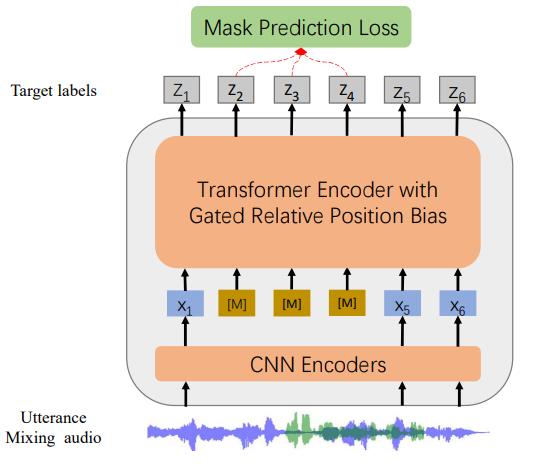
microsoft/wavlm-large powered by Hugging Face Inference Toolkit
Send Request
You can use cURL or any REST Client to send a request to the AzureML endpoint with your AzureML token.curl <AZUREML_ENDPOINT_URL> \
-X POST \
-H "Authorization: Bearer <AZUREML_TOKEN>" \
-H "Content-Type: application/json" \
-d '{"inputs":"Today is a sunny day and I will get some ice cream."}'
Supported Parameters
- inputs (string or string[]): Either the text to create the embeddings for, or a list of texts.
- normalize (boolean): Whether to normalize the embedding to be generated or not.
- prompt_name (string): The name of the prompt that should be used by for encoding. If not set, no prompt will be applied. Must be a key in the sentence-transformers configuration prompts dictionary. For example if prompt_name is "query" and the prompts is {"query": "query: ", …}, then the sentence "What is the capital of France?" will be encoded as "query: What is the capital of France?" because the prompt text will be prepended before any text to encode.
- truncate (boolean): Whether to truncate the input to match the max allowed input tokens or not.
- truncation_direction (enum): Possible values: Left, Right.
Model Specifications
LicenseUnknown
Last UpdatedAugust 2025
ProviderHugging Face